
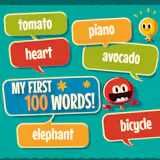
My First 100 Words
Casual • casual • mobile
Immerse your child in "My First 100 Words," a vibrant language adventure! They will explore multiple languages through playful interactions, spotting emojis while hearing correct pronunciations. With increasing challenges, they’ll build…
My First 100 Words puts you straight into the action: a easy-to-pick-up casual game where simple rules hide surprisingly deep challenges, level after level, run after run. Immerse your child in "My First 100 Words," a vibrant language adventure! They will explore multiple languages through playful interactions, spotting emojis while hearing correct pronunciations. With increasing challenges, they’ll build vocabulary and cultural awareness, making learning a captivating journey. Watch them thrive as they start a multilingual quest! Play My First 100 Words free on NepLox Games: instant browser play, fullscreen support, and no downloads or sign-ups. Built for mobile first — swipe, tap and drag with one hand on any phone or tablet.
About My First 100 Words
Immerse your child in "My First 100 Words," a vibrant language adventure! They will explore multiple languages through playful interactions, spotting emojis while hearing correct pronunciations. With increasing challenges, they’ll build…
Gameplay — My First 100 Words
- How do you play My First 100 Words? — My First 100 Words is a easy-to-pick-up casual game where simple rules hide surprisingly deep challenges. Open the page, press play and follow the short in-game tutorial — most players understand the controls in under a minute.
- What are the controls for My First 100 Words? — My First 100 Words uses mobile-first touch controls — swipe, tap and drag directly on the screen. On desktop you can use the mouse or arrow keys.
- Is My First 100 Words free to play? — Yes — 100% free. The game runs in your browser with no download, no installation and no account. You can start playing in seconds.
- Can I play My First 100 Words on my phone? — Yes. The game adapts to any screen size — play with touch controls on phones and tablets, or with mouse and keyboard on desktop.
FAQ
Frequently asked about this game
How do you play My First 100 Words?+
What are the controls for My First 100 Words?+
Is My First 100 Words free to play?+
Can I play My First 100 Words on my phone?+
Any tips to get better at My First 100 Words?+
Who made My First 100 Words?+
How to Play — My First 100 Words
- How do you play My First 100 Words?
My First 100 Words is a easy-to-pick-up casual game where simple rules hide surprisingly deep challenges. Open the page, press play and follow the short in-game tutorial — most players understand the controls in under a minute. - What are the controls for My First 100 Words?
My First 100 Words uses mobile-first touch controls — swipe, tap and drag directly on the screen. On desktop you can use the mouse or arrow keys. - Is My First 100 Words free to play?
Yes — 100% free. The game runs in your browser with no download, no installation and no account. You can start playing in seconds. - Can I play My First 100 Words on my phone?
Yes. The game adapts to any screen size — play with touch controls on phones and tablets, or with mouse and keyboard on desktop.


Escape The Trap
Arcade 8.8
Snake Classic
Arcade 9.7
Drive Mad
Racing 9.4
Cyber Racer
Racing 10.0
Invaders
Shooting 9.7
Space Shooter
Shooting 9.8