
Save the Crumb
Casual • casual • desktop
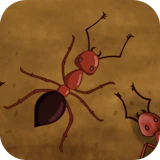
Defend a precious crumb from relentless ant invaders in Save the Crumb. Strategically repel waves of ants using quick reflexes on mouse or touchscreen. Rack up points for daring, close-call saves as you protect your crumb from becoming…
Save the Crumb is a easy-to-pick-up casual game where simple rules hide surprisingly deep challenges. Every session is a fresh chance to sharpen your technique and beat your personal best. Defend a precious crumb from relentless ant invaders in Save the Crumb. Strategically repel waves of ants using quick reflexes on mouse or touchscreen. Rack up points for daring, close-call saves as you protect your crumb from becoming ant chow. NepLox Games hosts Save the Crumb as a free instant-play browser game — nothing to install, nothing to pay. Designed for widescreen play — keyboard and mouse on desktop give you full control.
About Save the Crumb
Defend a precious crumb from relentless ant invaders in Save the Crumb. Strategically repel waves of ants using quick reflexes on mouse or touchscreen. Rack up points for daring, close-call saves as you protect your crumb from becoming…
Gameplay — Save the Crumb
- How do you play Save the Crumb? — Save the Crumb is a easy-to-pick-up casual game where simple rules hide surprisingly deep challenges. Open the page, press play and follow the short in-game tutorial — most players understand the controls in under a minute.
- What are the controls for Save the Crumb? — On desktop, steer with the arrow keys or WASD and act with the mouse. On mobile, Save the Crumb shows on-screen touch buttons tuned for landscape play.
- Is Save the Crumb free to play? — Yes — 100% free. The game runs in your browser with no download, no installation and no account. You can start playing in seconds.
- Can I play Save the Crumb on my phone? — Yes, though the game is designed for widescreen screens — it works best on desktop with a keyboard, and also runs on tablets and phones in landscape mode.
FAQ
Frequently asked about this game
How do you play Save the Crumb?+
What are the controls for Save the Crumb?+
Is Save the Crumb free to play?+
Can I play Save the Crumb on my phone?+
Any tips to get better at Save the Crumb?+
Who made Save the Crumb?+
How to Play — Save the Crumb
- How do you play Save the Crumb?
Save the Crumb is a easy-to-pick-up casual game where simple rules hide surprisingly deep challenges. Open the page, press play and follow the short in-game tutorial — most players understand the controls in under a minute. - What are the controls for Save the Crumb?
On desktop, steer with the arrow keys or WASD and act with the mouse. On mobile, Save the Crumb shows on-screen touch buttons tuned for landscape play. - Is Save the Crumb free to play?
Yes — 100% free. The game runs in your browser with no download, no installation and no account. You can start playing in seconds. - Can I play Save the Crumb on my phone?
Yes, though the game is designed for widescreen screens — it works best on desktop with a keyboard, and also runs on tablets and phones in landscape mode.






Escape The Trap
Arcade 8.8
Snake Classic
Arcade 9.7

Drive Mad
Racing 9.4

Cyber Racer
Racing 10.0

Invaders
Shooting 9.7

Space Shooter
Shooting 9.8